
Calculate Shipping Costs
on the Admin Side
Admin Order Shipping Cost Calculator
for WooCommerce
No More Manual Calculations
Save time, avoid mistakes — Ideal for helpdesk teams and phone orders
Automatically calculates shipping costs for admin orders
when editing them — just like at checkout

Recalculate shipping costs on the fly while
editing admin orders

Retrieve available shipping options
with prices and taxes

Choose and assign
the best shipping method
Create or edit orders, add products, and add or change the shipping method.
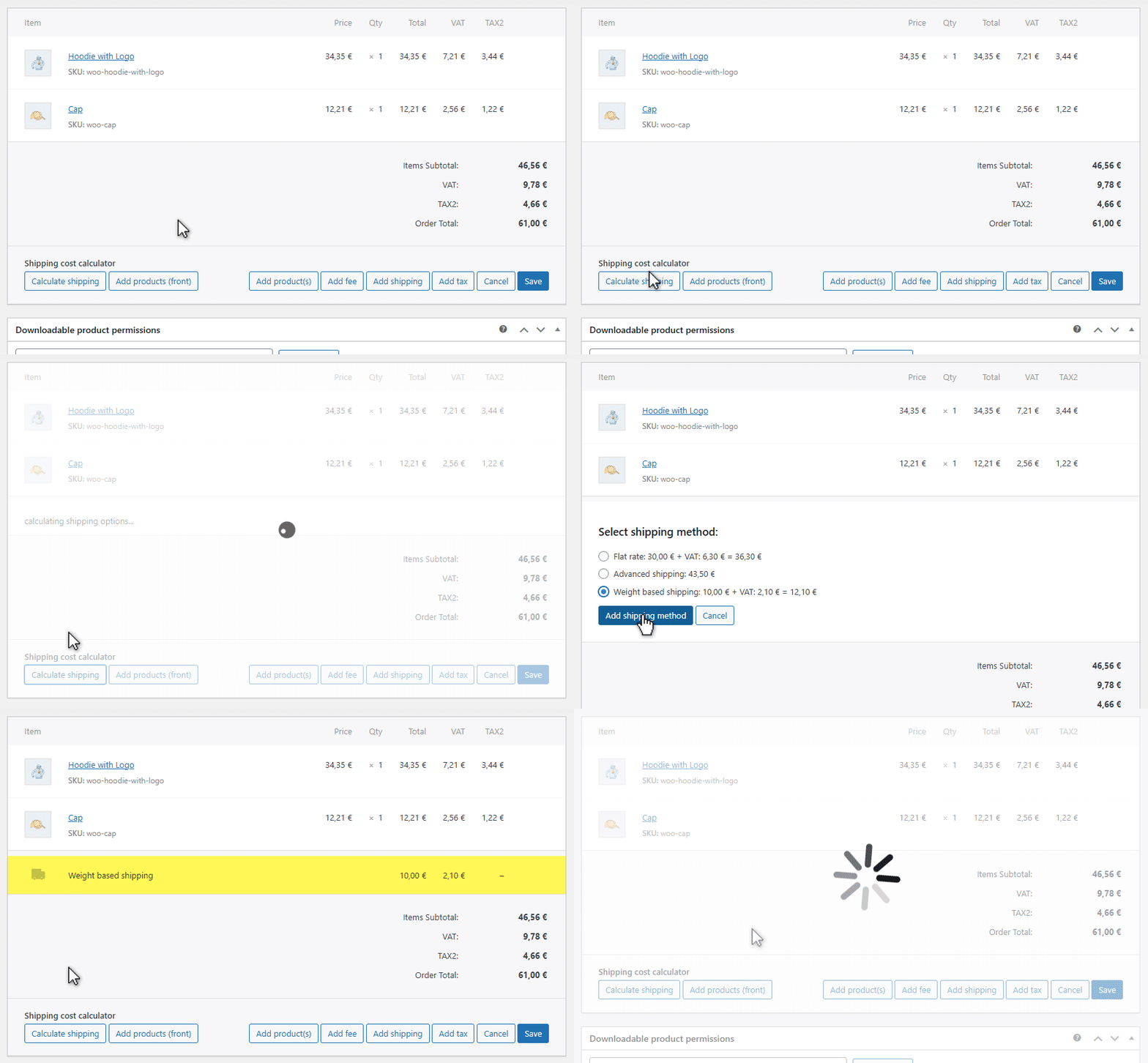
Calculate and apply shipping rate in admin side.
Accurate Shipping Rates in Admin
Get shipping costs calculated directly from your shipping methods:
- Based on the products in the order
- Based on the customer’s shipping address
- Compatible with most shipping plugins, from simple to advanced
- Get shipping costs calculated directly from your shipping methods
Support for Product Add-Ons
Are you selling products with options that affect shipping cost calculations?
Do your product options or custom fields
appear only on the front-end?
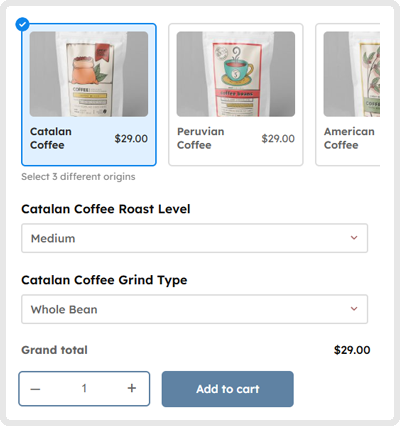
This plugin loads the actual front-end product page in a popup from the admin to handle these cases:
- Based on the products in the order
- Based on the customer’s shipping address
- Compatible with most shipping plugins, from simple to advanced
- Uses the same calculation logic as on the checkout page
Support for Multiple Packages
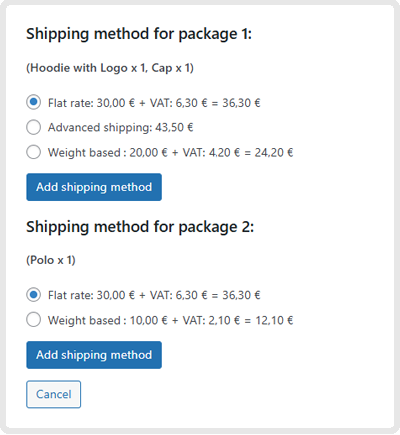
If your site already uses a plugin that splits the cart into multiple packages, this plugin fully supports it:
- View shipping options and prices for each package
- Assign shipping rates per package
- Works with all multi-package shipping plugins
Support for Customer Roles
Do you use different shipping rates based on customer role
— member, affiliate, guest...?
- If your shipping methods support different rates per customer role, this plugin does too.
- The customer role is recreated during calculation, ensuring you always get the correct shipping price
Frequently Asked Questions
About Admin Order Shipping Cost Calculator for WC
No setup is required. The plugin works out of the box, using your existing shipping methods and automatically recalculating rates when needed.
Simply install and activate the plugin, then create or edit an order. You’ll see a tooltip with the new buttons to calculate shipping rates.
Managing orders often requires manually recalculating shipping rates after editing products, quantities, or customer details. This process can be slow and error-prone.
This plugin lets you instantly recalculate shipping directly from the order screen — no extra steps, no switching to the front end, and no need to recreate the cart.
The result? Faster order processing, fewer mistakes, and a smoother workflow for your team.
Yes. Shipping taxes are handled through WooCommerce’s native tax system, including support for multiple tax rates and tax classes.
Any plugin that follows standard WooCommerce practices should be compatible. We have specifically tested the following plugins:
Official WooCommerce plugins:
- Advanced Shipping Packages link
- Canada Post Shipping Method link
- Conditional Shipping and Payments link
- Per Product Shipping link
- Role-Based Payment / Shipping Methods link
- Royal Mail Shipping Method link
- Table Rate Shipping link
- USPS Shipping Method link
Other tested plugins:
- Advanced Shipping Rates by wp-centrics
- Advanced Product Fields by Studio Wombat link
- Product Add-Ons Ultimate by Plugin Republic link
Yes. If your site already uses a plugin that splits orders into multiple shipping packages, this plugin fully supports it and will display the available shipping methods for each package.
No. The plugin only adds functionality to the WordPress admin area and does not affect the checkout process or front-end behavior.
It works with any theme, since it does not modify your store’s design or customer-facing experience.
The plugin is fully translatable using standard PO files.
It only displays messages in the WordPress admin area.
It is currently available in:
English, Chinese, French, German, Italian, Spanish and Catalan
No. At checkout, you can choose between:
– One-time payment: You pay once for the year. When your license is about to expire, we’ll send you a reminder email along with a renewal offer.
– Automatic annual subscription: Pay a fixed price equal to 50% of your initial one-time payment each year.
This way, you can decide whether you want the convenience of automatic renewal or prefer to manage your license manually.
Yes, we always allow upgrades:
– One-year licenses (subscription is optional): If you upgrade before your current yearly license expires, we will provide a coupon for the remaining time.
– Lifetime licenses: If you want to upgrade from a lower-tier license to a higher-tier one, for example from X1 to X5, we will give you full credit for your previous purchase, which will be applied toward the price of the new license.
This ensures you can always access more advanced versions without losing your initial investment.
Yes. You’re covered by a 15-day no-risk money-back guarantee.
If the plugin doesn’t meet your expectations, we’ll either fix the issue or refund your purchase — even if the problem involves a third-party plugin.
You can try it with confidence.
Get Admin Order Shipping Cost
Calculator for WooCommerce
Choose your license:
…or launch the demo, or see the FAQs again: